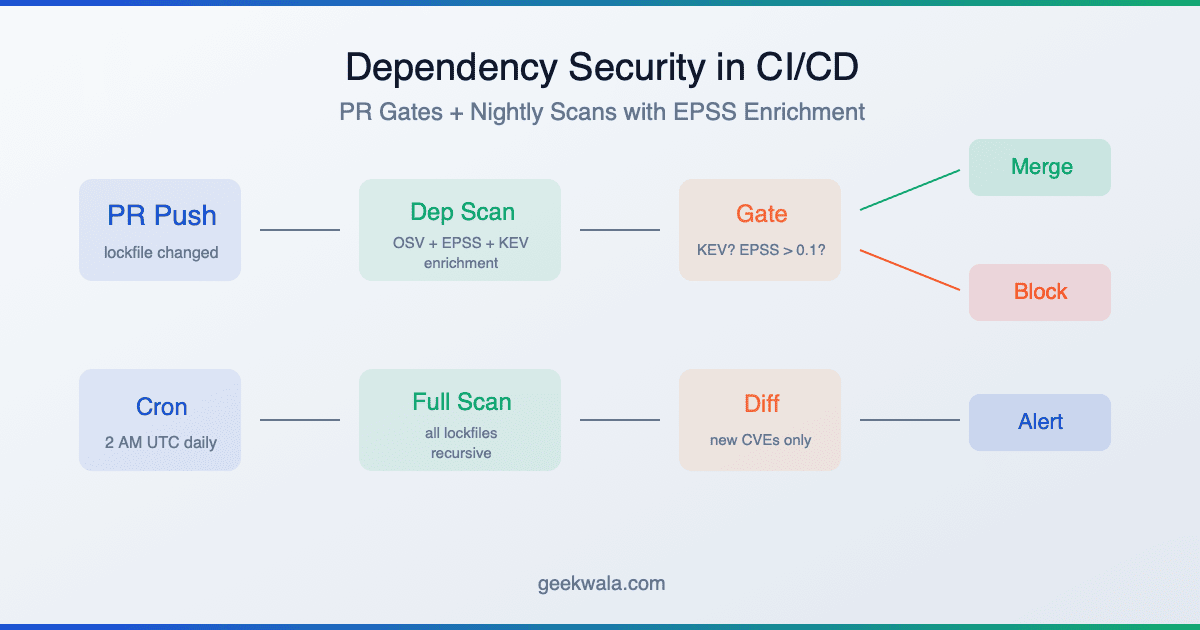
CI gates catch vulnerable packages at merge time. Nightly scans catch overnight disclosures. But CVEs drop continuously — your monitoring should too. Set up scheduled scans as a baseline, then add EPSS-filtered alerts so only actionable findings wake someone up. The goal: mean time to detection under 4 hours, false positive rate under 10%.
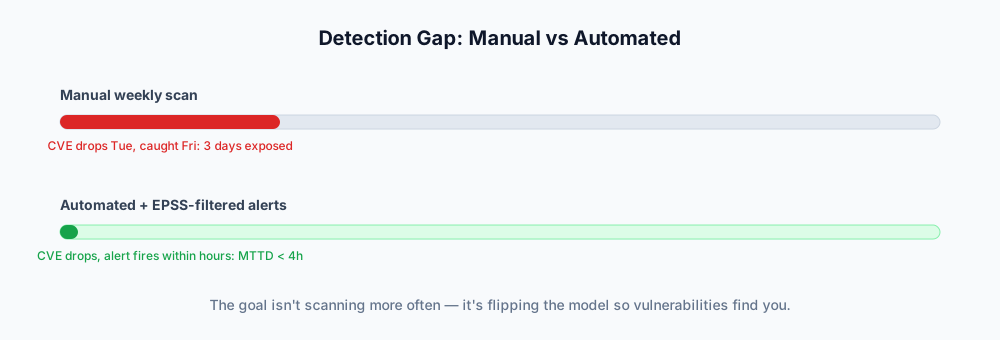
A critical CVE drops on Tuesday morning. Your dependency scan runs Friday afternoon. For three days, your production application is running a package with a known exploit — and nobody on your team knows.
This is the default state for most engineering teams. Even teams that have dependency scanning in their CI pipeline only catch vulnerabilities at two moments: when a developer changes a lockfile, and when the nightly cron fires. Everything between those checkpoints is a blind spot.
Automated dependency scanning closes that gap. Not by running scans more often (though that helps), but by flipping the model: instead of you checking for vulnerabilities, vulnerabilities find you.
The scheduling mechanism most teams already have available is GitHub's own schedule event trigger for Actions workflows — cron syntax, runs on the default branch, no extra infrastructure. It's a fine baseline; the gap this article covers is what happens between those cron ticks, and what to do with the alerts once they fire.
What We'll Cover
- The gap between CI scanning and production monitoring
- Three levels of automation
- Setting up scheduled scans
- Alert routing: not every CVE deserves a ping
- Measuring automation effectiveness
- Frequently asked questions
The Gap Between CI Scanning and Production Monitoring
Your CI/CD dependency gate does two things well: it blocks PRs that introduce known-vulnerable packages, and it runs a nightly scan against your default branch. If you've set that up, you're ahead of most teams.
But CI scanning is reactive to your development cycle. It runs when you push code. Vulnerability databases update when researchers disclose CVEs. Those two timelines don't align.
Here's what a typical week looks like with CI-only scanning:
Mon   Tue   Wed   Thu   Fri   Sat   Sun
 │     │     │     │     │     │     │
 │     │  CVE disclosed   │     │     │
 │     │  affecting       │     │     │
 │     │  your express    │     │     │
 │     │  version         │     │     │
 │     │     │     │     │     │     │
 ▼     ▼     ▼     ▼     ▼     ▼     ▼
─────────────────────────────────────────
 CI    CI         CI                Nightly
 run   run        run               scan
                                     │
                                     ▼
                              Team finds out
                              (5 days later)
The CI runs on Monday through Thursday didn't catch it because no lockfile changed — the vulnerability was in an existing dependency. The nightly scan runs Saturday at 2 AM (or whenever you configured it), and someone reads the alert Monday morning. Five days of exposure.
Continuous monitoring flips this. Instead of waiting for your next scan, a monitoring service watches the vulnerability databases and cross-references new disclosures against your registered dependency manifests. When a match appears, you know within minutes — not days.
Three Levels of Automation
Think of dependency scanning automation as a maturity ladder. Each level reduces your mean time to detection (MTTD):
┌─────────────────────────────────────────────────────┐
│  Level 3: Continuous Monitoring                     │
│  MTTD: < 4 hours                                   │
│                                                     │
│  Real-time CVE matching against your dependency     │
│  manifest. Alerts via webhook, Slack, or email      │
│  filtered by EPSS/KEV. No human triggers needed.    │
├─────────────────────────────────────────────────────┤
│  Level 2: Scheduled Scans (CI + Nightly)            │
│  MTTD: < 24 hours                                  │
│                                                     │
│  CI gates on PRs + nightly cron against main.       │
│  Catches most issues within a business day.         │
├─────────────────────────────────────────────────────┤
│  Level 1: Manual / Ad-Hoc                           │
│  MTTD: 3–14 days                                   │
│                                                     │
│  Someone remembers to run npm audit or checks       │
│  advisories before a release. Gaps measured in      │
│  weeks during busy sprints.                         │
└─────────────────────────────────────────────────────┘
Level 1 is where most teams start. It works until it doesn't — and when it fails, you find out during an incident.
Level 2 is the foundation. If you haven't set this up yet, start with our CI/CD integration guide. A PR gate plus a nightly scan gets your MTTD under 24 hours with about 20 minutes of setup.
Level 3 is the target for any application where a 24-hour detection gap is unacceptable. Financial services, healthcare, e-commerce checkout flows, authentication services — if attackers would specifically target your application, continuous monitoring is worth the investment.
Setting Up Scheduled Scans
Scheduled scans are the bridge between ad-hoc checks and continuous monitoring. They run automatically on a fixed cadence, independent of your development activity.
GitHub Actions cron is the simplest starting point:
on:
  schedule:
    - cron: '0 2 * * *'    # Daily at 2 AM UTC
    # - cron: '0 2 * * 1'  # Weekly on Monday (less aggressive)
If you're using a scanning platform like GeekWala, scheduled scans are configured per project — daily or weekly, on the Pro plan. The platform handles the cron and the diffing against previous results, then emails you and fires a scan.completed webhook listing new and resolved findings. New findings surface when a scan runs, so your cadence sets your detection window.
Choosing your cadence:
| Application Type | Recommended Cadence | Why |
|---|---|---|
| Public-facing web apps | Daily | Highest attack surface, most targeted |
| Internal tools | Weekly | Lower risk, fewer attackers |
| Libraries / SDKs | Daily | Your vulnerability becomes your consumers' vulnerability |
| Hobby projects | Weekly or on-demand | Lower stakes, but don't ignore entirely |
Daily scanning costs almost nothing in CI minutes (30 seconds per run) and catches disclosures within 24 hours. The only reason to scan weekly instead is if your team can't handle daily triage volume — which is a filtering problem, not a scanning problem.
Alert Routing: Not Every CVE Deserves a Ping
Here's where most teams get automation wrong: they set up scanning, get a flood of alerts, and either (a) turn it off or (b) start ignoring it. Alert fatigue kills automation faster than any technical limitation.
The fix is filtering. Not every CVE needs to wake someone up. Use EPSS scores and CISA KEV status to route findings to the right channel at the right urgency:
| Condition | Action | Channel | Timing |
|---|---|---|---|
| On CISA KEV | Immediate alert | Slack/PagerDuty | Within minutes |
| EPSS > 0.3 | Urgent notification | Slack channel | Same business day |
| EPSS 0.1–0.3 | Add to sprint backlog | Jira/Linear ticket | This sprint |
| EPSS < 0.1 | Batch into digest | Weekly email summary | Next maintenance window |
This routing means your team gets maybe 1–2 immediate alerts per month (KEV findings are rare but serious), a handful of urgent notifications per week, and a weekly digest that covers everything else. That's manageable. That's sustainable.
The weekly digest is doing real work. Those low-EPSS findings aren't irrelevant — they're just not urgent. Batching them into a weekly summary means someone reviews them on a predictable schedule without the context-switching cost of individual pings. The digest should include: finding count by severity, EPSS distribution, any findings whose EPSS score increased since last week (escalation signal), and a direct link to your scanning dashboard.
What about findings with no EPSS score? Some CVEs are too new to have an EPSS prediction (the model updates daily but needs initial data). Treat these as EPSS 0.15 — above the ignore threshold, below the emergency threshold. They'll get a real score within 24–48 hours.
Measuring Automation Effectiveness
You've set up scanning and alert routing. How do you know it's working? Track three metrics:
Mean Time to Detection (MTTD). The time between a CVE's public disclosure and your team learning about it. Before automation: days to weeks. After scheduled scans: under 24 hours. After continuous monitoring: under 4 hours. Measure this by comparing CVE disclosure timestamps against your first alert timestamp.
False Positive Rate. The percentage of alerts that required no action (the package isn't actually used in a reachable code path, the version range in the advisory is wrong, etc.). Target: under 10%. If you're above 20%, your thresholds are too aggressive — raise the EPSS cutoff or add more specific allowlist entries. If you're at 0%, you're probably filtering too aggressively and missing real issues.
Mean Time to Remediation (MTTR). The time between detection and the fix being deployed. Automation can't directly improve this — it's a function of your team's patching workflow. But it can expose bottlenecks: if your MTTD is 2 hours but your MTTR is 3 weeks, the scanning isn't the problem. Track MTTR by severity tier (KEV findings should have MTTR under 48 hours; low-EPSS findings might reasonably take 2–4 weeks).
MTTD < 24h ──── Your scanning automation is working
MTTD > 72h ──── You have a detection gap (scan more often)

False positive rate < 10% ──── Your filters are well-tuned
False positive rate > 20% ──── Tighten EPSS thresholds

MTTR (KEV) < 48h ──── Your emergency response works
MTTR (KEV) > 7d  ──── Process problem, not a tooling problem
Review these monthly. The numbers will shift as your dependency tree grows and as the vulnerability landscape evolves.
Frequently Asked Questions
How is automated scanning different from Dependabot or Renovate?
Dependabot and Renovate create pull requests to update outdated packages. They're update automation, not vulnerability scanning. They'll bump jquery from 3.4.1 to 3.5.0, but they won't tell you that 3.4.1 has a cross-site scripting flaw (CVE-2020-11023) on CISA KEV. You need both: Dependabot keeps dependencies fresh, scanning tools tell you which outdated versions are actually dangerous. See Dependabot vs GeekWala for a detailed comparison.
Will automated scanning slow down my team with too many alerts?
Only if you skip the filtering step. Raw vulnerability counts are useless — nobody should page a developer for a CVSS 6.2 with 0.01 EPSS in a dev-only dependency. Route alerts by EPSS/KEV severity and batch low-priority findings into a weekly digest. Most teams end up with 1–3 actionable alerts per week after proper filtering.
Can I automate the fix, not just the detection?
Partially. Dependabot and Renovate can auto-create PRs for version bumps. If your CI pipeline passes on the new version, you can even auto-merge low-risk updates. But security fixes sometimes require code changes beyond a version bump (API changes, deprecated function replacements), so full automation isn't always possible. Automate the detection and the PR creation; keep a human in the loop for the merge decision on breaking changes.
What if I have hundreds of projects to scan?
Platform-based scanning tools handle this better than CI-only approaches. Instead of maintaining a GitHub Actions workflow in every repo, you register projects once and the platform manages scanning, deduplication, and cross-project reporting. Look for tools that support bulk project import via GitHub App or API.
How do I convince my team to invest in Level 3 (continuous monitoring)?
Frame it as risk reduction, not tool adoption. Calculate your current detection gap: "Our nightly scan means a CVE disclosed at 10 AM Tuesday isn't caught until 2 AM Wednesday — a 16-hour window. For our payment processing service, that's 16 hours of known-exploitable exposure." Then compare the cost of the monitoring tool against one incident response engagement. The math usually works out quickly for any revenue-generating application.
Find out what your scheduled scans are missing.
Scan your dependencies now → — every finding is enriched with EPSS exploit probability and CISA KEV status. See the difference between "47 vulnerabilities found" and "2 need immediate action." No account required.
If your pipeline runs on GitLab CI or Jenkins rather than GitHub Actions, see Dependency Scanning in GitLab CI and Jenkins for platform-specific setup.