Create a free GeekWala account, scan a project, then generate a badge token from Automation → Status Badges. Embed the badge image in your README — Markdown, HTML, or reStructuredText all work. It auto-updates to green ("passing") or red with your vulnerability count, and clicking it opens a public scan page: a live status check and passive backlink in one.
Open source maintainers get the same question in issues and PRs eventually: "is this project's dependency tree safe to use?" A badge at the top of your README answers it before anyone has to ask — and unlike a one-time "we got audited" claim, it updates itself every time you rescan.
This follows the same dynamic-SVG convention as build-status and coverage badges served by Shields.io — a widely recognized pattern for embedding a live metric in a static README, rather than something GeekWala invented from scratch. The OpenSSF Scorecard project uses the same technique for its own supply-chain health badges.
What We'll Cover
- What the badge shows (live vulnerability status)
- Generate your badge in 60 seconds
- Markdown, HTML, and reStructuredText embed snippets
- How the badge updates when new CVEs drop
- Badge + scheduled scans: the always-on setup
- Frequently asked questions
What the Badge Shows (Live Vulnerability Status)
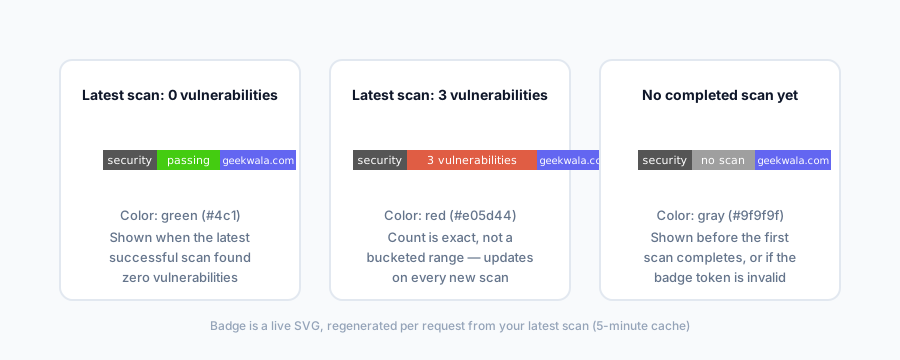
The badge is a dynamically generated SVG, not a static image you upload once. Every time it's requested, GeekWala checks your project's most recent successful scan and renders one of three states:
- Green — "security: passing." Your latest scan found zero vulnerabilities.
- Red — "security: N vulnerabilities." Your latest scan found one or more — the count is exact, not a bucketed range. Not every red badge needs the same urgency: see vulnerability prioritization for how to triage which of those N to fix first instead of treating them as equally urgent.
- Gray — "security: no scan." The project is registered but hasn't completed a scan yet, or the badge token is invalid.
Because it's generated per-request from your actual scan data (cached for 5 minutes to keep high-traffic READMEs fast), there's no manual step where you swap out an image after fixing a CVE — the next scan changes the badge automatically.
Generate Your Badge in 60 Seconds
- Create a free account and add the repository you want to badge — either upload a manifest manually or import directly from GitHub.
- Run a scan. The badge needs at least one completed scan to show anything other than "no scan."
- Open Automation → Status Badges and generate a token for the project. This creates a unique, unguessable token tied to that project — nobody can badge your repo without access to your account, and you can revoke and regenerate the token at any time if it leaks.
- Copy the embed code in your preferred format and paste it into your README.
No credit card, no paid plan required — badge generation is free for every account tier. Not sure what the finished badge looks like in practice? The badges page shows a live example before you commit to embedding one.
Markdown, HTML, and reStructuredText Embed Snippets
Replace YOUR_TOKEN with the token from Automation → Status Badges in each snippet below.
Markdown (GitHub, GitLab, most README files):
[](https://www.geekwala.com/scan/YOUR_TOKEN?utm_source=badge&utm_medium=readme&utm_campaign=security_badge)
HTML (websites, documentation sites):
<a href="https://www.geekwala.com/scan/YOUR_TOKEN?utm_source=badge&utm_medium=readme&utm_campaign=security_badge">
  <img src="https://www.geekwala.com/badge/YOUR_TOKEN" alt="GeekWala Security Status" width="130" height="20" />
</a>
reStructuredText (Python projects using Sphinx):
.. image:: https://www.geekwala.com/badge/YOUR_TOKEN
   :target: https://www.geekwala.com/scan/YOUR_TOKEN?utm_source=badge&utm_medium=readme&utm_campaign=security_badge
   :alt: GeekWala Security Status
All three formats point at the same two URLs: /badge/{token} serves the SVG image itself, and /scan/{token} is the link destination — a public scan summary page showing your project's package count, last-scanned date, and vulnerability breakdown by severity. That public page is the passive backlink: every visitor who clicks your badge lands on a GeekWala page that links back to your project, with zero outreach or link-building effort on your part.
How the Badge Updates When New CVEs Drop
The badge doesn't poll GitHub or watch for new commits on its own — it reflects whatever your most recent completed scan found. Two ways that scan happens:
- Manual re-scan — you or a teammate re-run a scan on the project, same as any other GeekWala project.
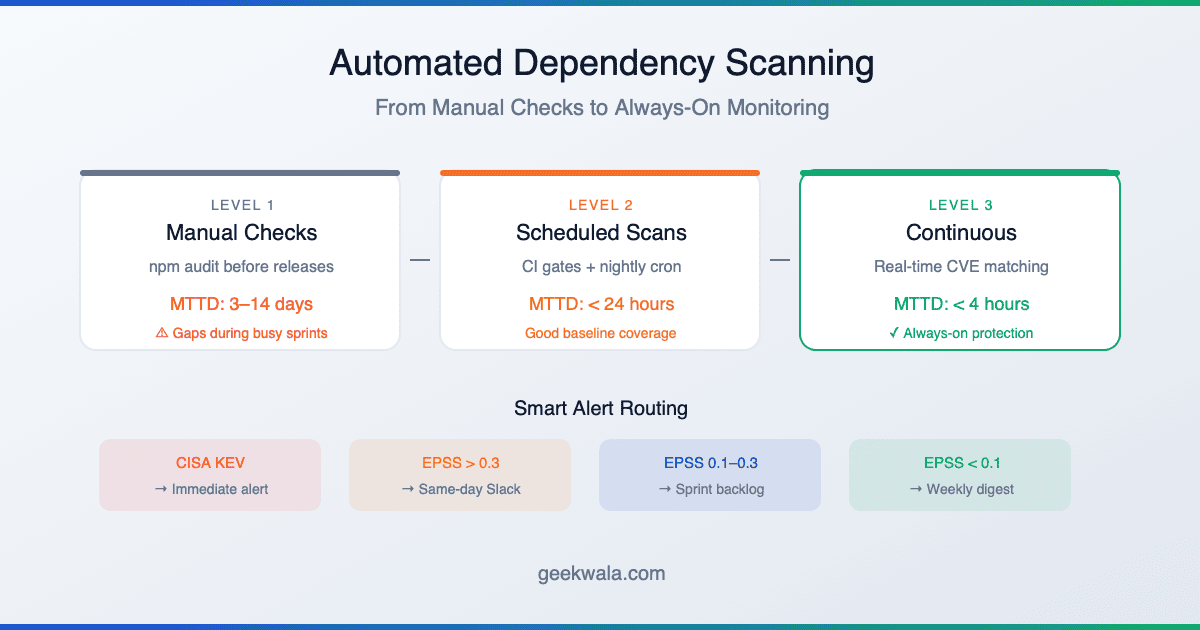
- Scheduled scans (Pro and Trial plans) — GeekWala automatically re-scans on a daily, weekly, or monthly cadence you configure, which means the badge reflects a newly disclosed CVE against your existing dependencies without anyone touching the project. See automated dependency scanning for how to set the cadence and route alerts once scheduled scans are on.
If a new CVE is disclosed against a package you depend on and your last scan predates the disclosure, the badge still shows whatever that last scan found until the next scan runs. This is the practical argument for scheduled scans over manual-only: a badge that's stale by weeks undersells the tool, and a badge that updates automatically is a stronger trust signal.
Badge + Scheduled Scans: The Always-On Setup
The badge and GitHub import are designed to compound. Import the repository so GeekWala has its dependency list (re-import after your dependencies change), enable scheduled scans so it re-checks that list automatically, then drop the badge in your README so the result is visible without anyone opening the dashboard. From there the loop runs itself:
- Scheduled scan runs → finds (or clears) vulnerabilities.
- Badge updates automatically on next request — no manual step.
- Anyone viewing your README sees current status, and clicking through lands on your public scan page.
- That public page is a live, always-fresh backlink to your project profile — no outreach email, no guest post, no directory submission.
For a maintainer managing more than one repository, this turns a single afternoon of setup into a permanently-updating trust signal across every project, with the growth benefit (inbound README links) accruing automatically alongside the security benefit.
Frequently Asked Questions
Is the badge free? Yes, badge generation and hosting are free on every plan, including Free.
Does the badge require my repository to be public? No — the project just needs to exist in your GeekWala account and have completed at least one scan. The badge and its linked public scan page are public regardless of whether the underlying GitHub repository is public or private.
Can I revoke a badge? Yes, from Automation → Status Badges — revoking deletes the token, so the old embed URL immediately starts returning an "invalid token" gray badge instead of your project's real status.
Will the badge slow down my README on GitHub? No — badge responses are small SVGs served with a 5-minute cache header, the same pattern used by Shields.io and similar badge services.