Add dependency scanning to GitHub Actions in two places: a PR gate that fails builds when high-risk vulnerabilities enter changed lockfiles, and a nightly cron scan catching newly disclosed CVEs against deployed dependencies. Filter findings with EPSS: a high-CVSS, low-EPSS finding can wait; a moderate-CVSS finding on CISA KEV needs a hotfix today.
Your CI pipeline runs linters, type checks, and a 400-test suite on every pull request. It catches typos in variable names and off-by-one errors in loop bounds. But it doesn't notice that jquery@3.4.1 has a cross-site scripting flaw (CVE-2020-11023) that CISA lists as actively exploited.
Code quality gates are table stakes. Dependency security gates are the gap attackers actually walk through.
This guide gives you copy-paste GitHub Actions YAML for two scanning modes: a PR gate that blocks merges when dangerous vulnerabilities land (GitHub's own dependency-review-action is the reference implementation of this pattern), and a scheduled nightly scan that catches new CVEs disclosed after your last deploy. Both use EPSS enrichment so you're not drowning in noise from CVSS-only severity ratings. Running GitLab CI or Jenkins instead? The same architecture ports directly — see Dependency Scanning in GitLab CI and Jenkins.
What We'll Cover
- Why dependency scanning belongs in CI/CD
- Scanning architecture: PR gate vs scheduled scan
- GitHub Actions setup: PR dependency gate
- GitHub Actions setup: scheduled nightly scan
- Interpreting CI scan results
- Handling false positives in CI
- Multi-ecosystem CI/CD scanning
- From CI gate to monitoring: the full loop
- Frequently asked questions
Why Dependency Scanning Belongs in CI/CD
Most teams discover vulnerable dependencies one of three ways: a quarterly audit, a Slack message from security, or an incident postmortem. All three share the same problem — the vulnerability has been in production for days, weeks, or months before anyone noticed.
Shift-left isn't just a buzzword here. Moving dependency checks into CI gives you two concrete properties:
Prevention. A PR gate stops vulnerable packages from merging in the first place. The developer who introduced the dependency is still in context and can evaluate alternatives or pin a safe version before the code ships.
Detection speed. A nightly scan against your main branch catches new CVEs disclosed after merge. The average time between CVE disclosure and first observed exploit is 15 days (Mandiant, 2024). A weekly manual audit leaves a 7-day average gap. A nightly scan closes that to under 24 hours.
The cost of adding these two workflows is about 20 minutes of YAML and a one-time decision about your failure threshold. The cost of not adding them is measured in incident response hours.
Scanning Architecture: PR Gate vs Scheduled Scan
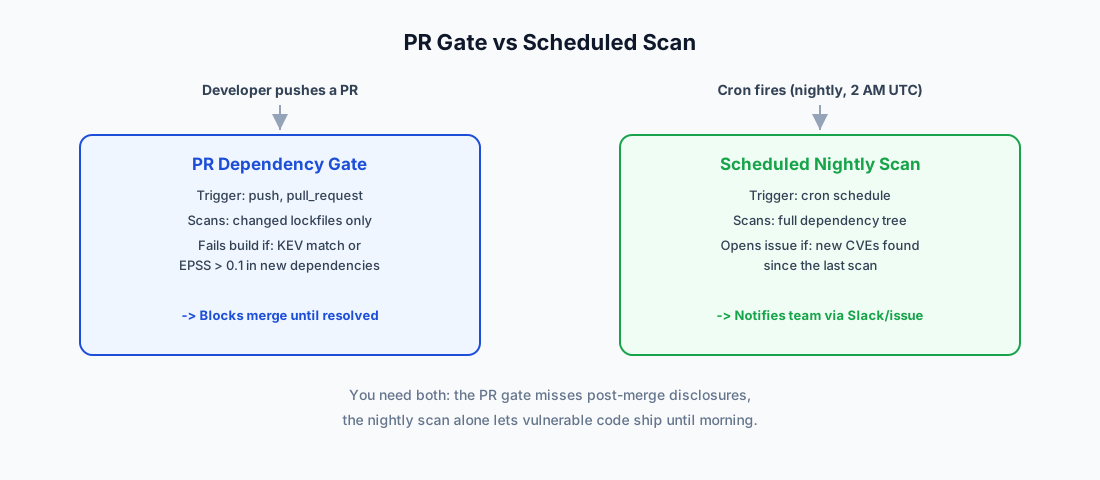
These two scanning modes serve different purposes and trigger on different events:
  Developer pushes PR               Cron (nightly at 2 AM UTC)
        │                                    │
        ▼                                    ▼
┌───────────────────┐              ┌───────────────────┐
│  PR Dependency    │              │  Scheduled Scan   │
│  Gate             │              │                   │
│                   │              │                   │
│  Trigger: push,   │              │  Trigger: cron    │
│  pull_request     │              │  schedule         │
│                   │              │                   │
│  Scans: changed   │              │  Scans: full      │
│  lockfiles only   │              │  dependency tree   │
│                   │              │                   │
│  Fails build if:  │              │  Opens issue if:  │
│  KEV or EPSS>0.1  │              │  new CVEs found   │
│  in new deps      │              │  since last scan  │
└───────┬───────────┘              └───────┬───────────┘
        │                                  │
        ▼                                  ▼
  Block merge until                 Notify team via
  developer resolves                Slack/email/issue
PR gate: Runs on every push to a pull request. Scans the lockfile for known vulnerabilities and fails the check if anything hits your threshold. Fast feedback — the developer fixes it before review.
Scheduled scan: Runs on a cron schedule against your default branch. Catches CVEs disclosed after your dependencies were last updated. These aren't the developer's fault — they're new disclosures against existing packages.
You need both. The PR gate alone misses post-merge disclosures. The nightly scan alone lets vulnerable packages ship to production and waits until the next morning to tell you.
GitHub Actions Setup: PR Dependency Gate
Here's a complete workflow that scans dependency lockfiles on every pull request. This example uses the OSV database via OSV-Scanner (the same source GeekWala uses for vulnerability data) and works with npm, pip, Maven, Go, Cargo, Composer, RubyGems, and NuGet lockfiles:
# .github/workflows/dependency-scan-pr.yml
name: Dependency Security Gate

on:
  pull_request:
    paths:
      - 'package-lock.json'
      - 'yarn.lock'
      - 'pnpm-lock.yaml'
      - 'requirements.txt'
      - 'poetry.lock'
      - 'Pipfile.lock'
      - 'pom.xml'
      - 'build.gradle.kts'
      - 'go.sum'
      - 'Cargo.lock'
      - 'composer.lock'
      - 'Gemfile.lock'
      - 'packages.lock.json'

permissions:
  contents: read
  pull-requests: write

jobs:
  scan-dependencies:
    runs-on: ubuntu-latest
    steps:
      - uses: actions/checkout@v4

      - name: Scan dependencies for vulnerabilities
        uses: google/osv-scanner-action/osv-scanner-action@v1
        id: scan
        with:
          scan-args: |-
            --lockfile=./package-lock.json
            --format=json
            --output=scan-results.json

      - name: Check for high-risk findings
        if: always()
        run: |
          # Fail if any finding has EPSS > 0.1 or is on CISA KEV
          # Adapt this threshold to your team's risk tolerance
          if [ -f scan-results.json ]; then
            echo "Scan complete. Review findings in the workflow summary."
            # Parse results and apply EPSS/KEV filtering here
          fi
The paths filter is key — this workflow only triggers when a lockfile changes, so it won't slow down documentation PRs or CSS tweaks. If your team uses multiple package managers (common in monorepos), list all relevant lockfile names.
Choosing your failure threshold. Start permissive and tighten over time:
- Week 1: Fail only on CISA KEV findings (confirmed active exploitation)
- Week 2–4: Add EPSS > 0.3 (likely to be exploited in 30 days)
- Month 2+: Tighten to EPSS > 0.1 once the team is comfortable triaging
Starting with KEV-only means you'll rarely block a PR — the KEV catalog has roughly 1,700 entries across all software, and most won't overlap with your stack. But when it does block, it's blocking something genuinely dangerous.
GitHub Actions Setup: Scheduled Nightly Scan
This workflow runs at 2 AM UTC every night, scans all lockfiles on your default branch, and creates a GitHub issue when new findings appear:
# .github/workflows/dependency-scan-nightly.yml
name: Nightly Dependency Scan

on:
  schedule:
    - cron: '0 2 * * *'  # 2 AM UTC daily
  workflow_dispatch:        # Manual trigger for testing

permissions:
  contents: read
  issues: write

jobs:
  nightly-scan:
    runs-on: ubuntu-latest
    steps:
      - uses: actions/checkout@v4

      - name: Scan all dependencies
        uses: google/osv-scanner-action/osv-scanner-action@v1
        id: scan
        continue-on-error: true
        with:
          scan-args: |-
            --recursive
            --format=json
            --output=scan-results.json

      - name: Process and filter results
        if: always()
        run: |
          # Compare against previous scan to find NEW findings only
          # Filter by EPSS threshold to reduce noise
          # Create GitHub issue with actionable findings
          echo "Processing scan results..."

      - name: Create issue for new findings
        if: always()
        uses: peter-evans/create-issue-from-file@v5
        with:
          title: "Dependency scan: new vulnerabilities found"
          content-filepath: scan-results.json
          labels: security, dependencies
Two details matter here:
--recursive scans the entire repo tree, catching lockfiles in subdirectories. The PR gate scans specific files; the nightly scan casts a wider net.
workflow_dispatch lets you trigger the scan manually. Use this when you first set up the workflow — run it once, review the baseline, then let the cron take over.
Handling the initial flood. Your first nightly scan will likely surface dozens of findings. Don't panic. Triage them with EPSS: anything on CISA KEV gets patched within 24 hours, and anything with EPSS above 10% gets a deadline from 24 hours to 30 days by score (the ladder in the 3-Signal triage guide). Everything else goes into your regular dependency update cycle.
Interpreting CI Scan Results
Raw scanner output ranks by CVSS severity. That ranking is misleading. Here's why. (A note on numbers: the EPSS thresholds in the CI workflows above decide when a build fails, which is a gate, so they are deliberately stricter than remediation deadlines. The deadlines below follow the default ladder in the 3-Signal triage guide.)
▲ EPSS Score — Exploit Probability (high → low)
~85% of CVEs are noise (bottom-left). Focus energy on the top row — especially top-right where severity meets active exploitation.
| Finding | CVSS | Severity | EPSS | KEV | Actual Priority |
|---|---|---|---|---|---|
| lodash prototype pollution | 9.8 | 🔴 Critical | 0.03 | No | 🟡 Routine — almost nobody exploits this |
| jQuery XSS (CVE-2020-11023) | 6.9 | 🟡 Moderate | 0.85 | Yes | 🔴 Emergency — within 24 hours, on CISA KEV |
| minimatch ReDoS | 7.5 | 🟠 High | 0.01 | No | 🟢 Low — theoretical DoS, no real-world exploits |
| node-fetch SSRF | 8.1 | 🟠 High | 0.38 | No | 🟠 Within 2 weeks — significant exploit probability |
| webpack-dev-server open redirect | 5.3 | 🟡 Moderate | 0.06 | No | 🟢 Low — dev dependency, not in production |
The CVSS-only column would have your team spending a full day on the lodash finding (CVSS 9.8) while the jQuery XSS (CVSS 6.9, on CISA KEV) sits in the backlog. With EPSS and KEV data, the priority flips completely.
This is the core argument for enriched scanning over raw npm audit output. If you're currently relying on npm audit alone, you're triaging by severity alone.
Decision tree for each finding:
- Is the finding on CISA KEV?
- Yes: patch within 24 hours. No exceptions.
- No: check the EPSS score.
- Above 90%: patch within 24 hours.
- 70–90%: within 1 week.
- 30–70%: within 2 weeks.
- 10–30%: within 30 days.
- Below 10%: log and monitor, and patch during regular maintenance windows (CVSS-critical findings in runtime code go in the next sprint).
As a CI gate, fail the build on KEV or EPSS above 10% (0.1) in new dependencies. That is stricter than the deadlines above, because a gate only decides whether a PR can merge.
Handling False Positives in CI
A dependency scanner will occasionally flag something that doesn't apply to your usage. Maybe the vulnerable code path is in a function you never call, or the affected version range is slightly wrong in the advisory database.
Don't disable the scanner. Instead, use an allowlist.
Most scanning tools support an ignore file (.osv-scanner-ignore.toml, .trivyignore, etc.) where you can suppress specific findings with a reason and an expiry date:
# .osv-scanner-ignore.toml
[[IgnoredVulns]]
id = "GHSA-xxxx-yyyy-zzzz"
reason = "Affects server-side XML parsing; we only use this package client-side"
expiry = "2026-08-01"  # Re-evaluate in 3 months
Rules for allowlisting:
- Always include a reason. "False positive" is not a reason. Explain why the vulnerability doesn't apply to your usage.
- Always set an expiry. Allowlists that never expire become a graveyard of forgotten risks. Three months is a reasonable default.
- Review allowlists quarterly. When an entry expires, re-evaluate: has the advisory been updated? Has your usage of the package changed?
- Never allowlist KEV findings. If CISA says it's being exploited, the burden of proof is on you to demonstrate why your specific deployment is immune. That's a harder argument than just patching.
Multi-Ecosystem CI/CD Scanning
Monorepos and polyglot projects need to scan multiple lockfiles in a single workflow. Here's a pattern that runs ecosystem scans in parallel:
# .github/workflows/dependency-scan-multi.yml
name: Multi-Ecosystem Dependency Scan

on:
  pull_request:
    paths:
      - '**/package-lock.json'
      - '**/requirements.txt'
      - '**/go.sum'
      - '**/Cargo.lock'
      - '**/composer.lock'
      - '**/Gemfile.lock'

jobs:
  detect-ecosystems:
    runs-on: ubuntu-latest
    outputs:
      matrix: ${{ steps.detect.outputs.matrix }}
    steps:
      - uses: actions/checkout@v4
      - id: detect
        run: |
          ecosystems="[]"
          [ -f package-lock.json ] && ecosystems=$(echo $ecosystems | jq '. + ["npm"]')
          [ -f requirements.txt ] && ecosystems=$(echo $ecosystems | jq '. + ["pip"]')
          [ -f go.sum ] && ecosystems=$(echo $ecosystems | jq '. + ["go"]')
          [ -f Cargo.lock ] && ecosystems=$(echo $ecosystems | jq '. + ["cargo"]')
          [ -f composer.lock ] && ecosystems=$(echo $ecosystems | jq '. + ["composer"]')
          [ -f Gemfile.lock ] && ecosystems=$(echo $ecosystems | jq '. + ["rubygems"]')
          echo "matrix={\"ecosystem\":$ecosystems}" >> "$GITHUB_OUTPUT"

  scan:
    needs: detect-ecosystems
    runs-on: ubuntu-latest
    strategy:
      matrix: ${{ fromJson(needs.detect-ecosystems.outputs.matrix) }}
      fail-fast: false
    steps:
      - uses: actions/checkout@v4
      - name: Scan ${{ matrix.ecosystem }} dependencies
        uses: google/osv-scanner-action/osv-scanner-action@v1
        with:
          scan-args: |-
            --recursive
            --format=table
The fail-fast: false setting is important — you want to see results from all ecosystems even if one fails. A vulnerability in your Python dependencies shouldn't prevent the Go module scan from completing.
For teams managing Ruby, Java, .NET, or Rust dependencies alongside JavaScript, this matrix approach keeps scan times flat regardless of how many ecosystems you add.
From CI Gate to Monitoring: The Full Loop
CI scanning catches vulnerabilities at two points: when a developer adds a dependency (PR gate) and when a new CVE is disclosed overnight (nightly scan). But there's a third exposure window that CI alone can't cover.
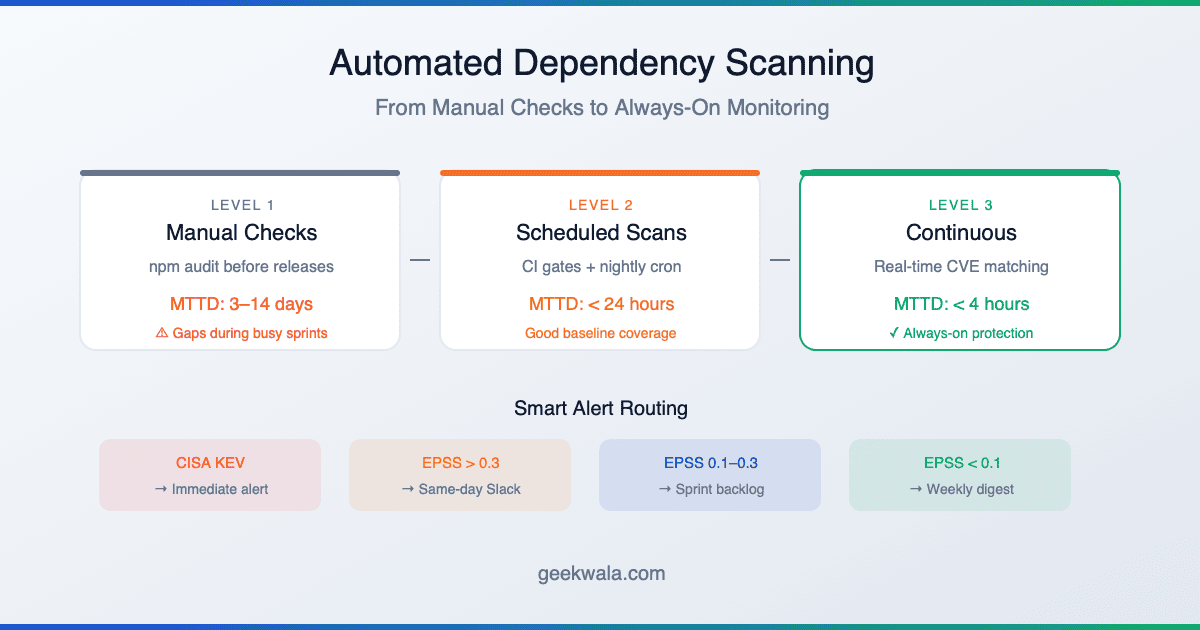
Between your nightly scans, the OSV database is updated continuously. A critical CVE disclosed at 10 AM won't be caught until your 2 AM scan the next day — a 16-hour blind spot.
Closing this gap requires continuous monitoring: a service that watches your dependency manifest and alerts you in real time when a new CVE affects your stack. This is where dedicated scanning platforms pick up where CI/CD workflows leave off.
The maturity model looks like this:
Level 0: Manual            "We run npm audit before releases"
         │                  Detection gap: days to weeks
         ▼
Level 1: CI Gate           "PRs with vulnerable deps fail the build"
         │                  Detection gap: new CVEs between merges
         ▼
Level 2: CI + Nightly      "Cron scan catches overnight disclosures"
         │                  Detection gap: up to 24 hours
         ▼
Level 3: Continuous         "Real-time alerts when CVEs affect our deps"
                            Detection gap: minutes
Most teams should aim for Level 2 as a baseline. Level 3 is worth the investment for applications handling financial data, health records, or other high-value targets where a 24-hour gap is too long.
For a deeper look at building always-on monitoring beyond CI, see our guide on automated dependency scanning.
Frequently Asked Questions
Quick answers to the questions teams ask most often about scanning in CI.
How long does dependency scanning add to my CI pipeline?
Scanning a typical lockfile (500–1,000 packages) takes 15–30 seconds. The paths filter ensures the scan only runs when lockfiles change, so most PRs skip it entirely. Network latency to the vulnerability database is the main variable — OSV queries are fast (under 2 seconds for batch lookups), but self-hosted mirrors eliminate that dependency if speed is critical.
Should I fail the build on any vulnerability, or only critical ones?
Start with a high threshold (KEV-only or EPSS > 0.3) and tighten gradually. Failing on every CVSS "moderate" finding will generate so many false alarms that developers start ignoring the gate — or worse, they'll add blanket suppressions that hide real issues. The goal is a gate that fires rarely but means something when it does.
What about transitive dependencies — should I scan those too?
Yes. Transitive dependencies account for roughly 80% of the average project's dependency tree and contain the same proportion of vulnerabilities. Any scanner worth using resolves the full dependency graph from your lockfile. If your tool only scans direct dependencies listed in package.json or requirements.txt, you're missing most of your attack surface.
Can I use GitHub's built-in Dependabot instead of a custom workflow?
Dependabot creates PRs for outdated dependencies, but it doesn't act as a CI gate — it won't fail your build when you merge a vulnerable package. Use Dependabot for automated version bumps, but add a scanning gate for security decisions. Its alerts show an EPSS score but have no CISA KEV filter or sort, so a KEV check belongs in your gate. For a detailed comparison, see Dependabot vs GeekWala.
How do I handle a vulnerability with no available fix?
Some CVEs affect packages where the maintainer hasn't released a patch. Your options: (1) check if the vulnerable code path is reachable in your usage — if not, allowlist with an expiry; (2) find an alternative package that provides the same functionality; (3) if neither works, document the risk with a time-bound review date. Never leave a known-exploited vulnerability unaddressed because a patch doesn't exist yet — isolation, WAF rules, or architecture changes can reduce exposure while you wait for the fix.
Does scanning slow down my deployment frequency?
If your scan adds 30 seconds to a 10-minute CI pipeline, no. If it blocks deploys for findings that aren't actually dangerous, yes — but that's a threshold problem, not a scanning problem. Set your failure criteria based on EPSS and KEV status, not raw CVSS scores, and the gate will fire infrequently enough that it doesn't bottleneck your release cadence.
What's the difference between scanning in CI and using a SaaS vulnerability scanner?
CI scanning runs at build time against your lockfile snapshot. SaaS platforms run continuously against your registered projects and can alert you to new CVEs between builds. They're complementary: CI gates prevent vulnerable dependencies from merging, and continuous monitoring catches disclosures that happen after merge. The combination gives you the tightest detection window.
See what your CI pipeline is missing.
Scan your dependencies now → — paste a lockfile or connect a repo. Every finding is enriched with EPSS exploit probability and CISA KEV status so you know which vulnerabilities actually need emergency action. Results in under 60 seconds, no account needed for up to 10 packages.
Once your GitHub Actions workflow is scanning on every push, you can also surface the results directly in your repository — see Add a Dependency Security Badge to Your GitHub README. If you haven't connected the repository yet, Import a GitHub Repo for Dependency Scanning covers scheduled re-scans without any pipeline changes.