A lockfile pins resolved versions and, where it stores integrity hashes, detects tampering between publish and install. It does not make a pinned version safe: March's lockfile keeps March's vulnerabilities until someone updates it. It does not stop install scripts; some package managers block those on their own. It does not prove who built a package, and not every lockfile carries hashes.
"Commit your lockfile" turns up in onboarding docs, blog posts, and Stack Overflow answers about reproducible builds. It is rarely examined. Committing a lockfile guarantees three specific things. It does not guarantee four others, and in our experience most teams can't say which is which. They just know the rule.
That gap matters because it's exactly where teams get burned. They commit package-lock.json, feel done with dependency security, and then get surprised when a postinstall script exfiltrates CI secrets from a package the lockfile pinned perfectly.
What We'll Cover
- What a lockfile actually records
- The three real guarantees
- The four things it doesn't guarantee
- Lockfile drift, and why CI catches it late
- Should a library commit its lockfile?
- Scanning the lockfile vs. scanning the manifest
- FAQ
What a Lockfile Actually Records
Every lockfile format solves the same basic problem: your manifest (package.json, pyproject.toml, Cargo.toml, Gemfile) declares version ranges, and something has to record which exact versions got resolved so the next install doesn't re-resolve into something different. What varies is how much detail each format keeps, and whether it keeps a hash at all.
Here's a trimmed entry from each. Every hash below was checked against its registry (npm, PyPI, crates.io, RubyGems) on 2026-11-08.
npm's package-lock.json (lockfileVersion 3):
"node_modules/lodash": {
  "version": "4.17.21",
  "resolved": "https://registry.npmjs.org/lodash/-/lodash-4.17.21.tgz",
  "integrity": "sha512-v2kDEe57lecTulaDIuNTPy3Ry4gLGJ6Z1O3vE1krgXZNrsQ+LFTGHVxVjcXPs17LhbZVGedAJv8XZ1tvj5FvSg=="
}
The integrity field is a Subresource Integrity (SRI) hash. npm records one for every registry package, and has since lockfile version 1 (npm 5), so there's no opt-in step (package-lock.json docs).
Python's requirements.txt with --hash, or poetry.lock:
requests==2.31.0 \
    --hash=sha256:942c5a758f98d790eaed1a29cb6eefc7ffb0d1cf7af05c3d2791656dbd6ad1e1 \
    --hash=sha256:58cd2187c01e70e6e26505bca751777aa9f2ee0b7f4300988b709f44e013003f
That's one hash for the sdist and one for the wheel; in hash-checking mode, pip installs only if the downloaded file matches one of them. poetry.lock stores the same pair of hashes per package, structurally, under a files key:
[[package]]
name = "requests"
version = "2.31.0"
files = [
    {file = "requests-2.31.0-py3-none-any.whl", hash = "sha256:58cd2187c01e70e6e26505bca751777aa9f2ee0b7f4300988b709f44e013003f"},
    {file = "requests-2.31.0.tar.gz", hash = "sha256:942c5a758f98d790eaed1a29cb6eefc7ffb0d1cf7af05c3d2791656dbd6ad1e1"},
]
Plain requirements.txt without --hash lines records no integrity data at all: just a version list, nothing more.
Rust's Cargo.lock:
[[package]]
name = "serde"
version = "1.0.228"
source = "registry+https://github.com/rust-lang/crates.io-index"
checksum = "9a8e94ea7f378bd32cbbd37198a4a91436180c5bb472411e48b5ec2e2124ae9e"
Crates from crates.io get a checksum line like the one above. As with npm, there's nothing to turn on.
Ruby's Gemfile.lock:
This is where the story is more interesting than the flat "Ruby has no hashes" claim you'll see repeated elsewhere. It changed in two steps. Bundler 2.6 (December 2024) added an opt-in CHECKSUMS section. Enable it per-lockfile with bundle lock --add-checksums, or for all future lockfiles with bundle config set lockfile_checksums true. Bundler 4 (December 2025) made it the default for newly generated lockfiles. Here's what the section looks like for two Rails 8 dependencies:
CHECKSUMS
  activesupport (8.0.4) sha256=894a3a6c7733b5fae5a7df3acd76c4b563f38687df8a04fa3cbd25360f3fe95a
  base64 (0.3.0) sha256=27337aeabad6ffae05c265c450490628ef3ebd4b67be58257393227588f5a97b
The catch: Bundler never retrofits an existing lockfile. A Gemfile.lock generated before you upgraded, and never regenerated since, still has zero hashes today, regardless of which Bundler version is now installed on your machine. So the honest version of this claim isn't "Ruby lockfiles have no hashes" or "Ruby lockfiles have hashes now." It's: a lockfile generated before the upgrade carries none until it's regenerated, and a new one under Bundler 4 carries them by default. Name the Bundler version whenever you say this out loud, because the answer depends on it.
| Format | Resolved version | Source location | Integrity hash | Transitive graph | Platform variants |
|---|---|---|---|---|---|
package-lock.json (npm) | Yes | Yes (tarball URL) | Yes (registry packages) | Yes | Yes (optional deps per OS/CPU) |
poetry.lock | Yes | Implicit (PyPI index) | Yes (registry packages) | Yes | No — wheel selection happens at install time |
requirements.txt | Yes | Implicit | Only with --hash lines | No | No |
Cargo.lock | Yes | Yes (registry URL) | Yes (registry packages) | Yes | No |
Gemfile.lock | Yes | Yes (source block) | Bundler 2.6+ opt-in, Bundler 4+ default on new lockfiles | Yes | Yes (platform-suffixed entries like -java, -x86_64-linux) |
The Three Real Guarantees
Strip away the marketing framing and a committed lockfile gives you exactly three things, all mechanical, none of them a safety judgment:
Reproducibility across machines. Everyone who runs an install against the same lockfile gets the same resolved versions: your laptop, your coworker's, and the CI runner all land on identical dependency trees. Without a lockfile, a version range like ^4.17.0 can resolve differently on two machines running the install a week apart, if a new matching release shipped in between.
Detection of artifact tampering, where a hash exists. If the registry serves a file whose bytes don't match the recorded hash, the install fails instead of silently accepting a swapped artifact (pip's hash-checking mode refuses the file, for example). This is the guarantee that does real security work, but only in the formats and configurations that actually record a hash. A requirements.txt with no --hash lines gives you none of this.
An auditable record of the exact transitive set at a point in time. Your lockfile is a complete, timestamped list of every package your build actually pulled in, not just the dozen you declared. Nine months from now, you can answer "what did we actually ship on March 3rd" by reading the lockfile from that commit, not by re-resolving anything.
That's the full list. Everything else people expect from "we committed our lockfile" is a guarantee they're assuming, not one the file provides.
The Four Things It Doesn't Guarantee
This is the part that gets skipped, and it's the part that matters more than the three guarantees above.
A pinned version is not a safe version. Pinning freezes your exposure at a point in time; it doesn't remove it. If left-pad@1.3.0 had a prototype-pollution bug the day you locked it, your lockfile faithfully preserves that bug indefinitely, right up until someone bumps the version and regenerates the file. A lockfile committed in March is a March-era vulnerability profile, full stop, and it stays that way until you touch it again.
Install scripts still run unless your package manager blocks them. The lockfile has no say over postinstall, preinstall, and their equivalents in other ecosystems: a pinned, hash-verified package runs exactly the same script as an unpinned one. npm 12 (July 2026) and pnpm 10 now block dependency lifecycle scripts by default unless you allowlist them (allowScripts in npm, onlyBuiltDependencies in pnpm), but that protection comes from the package manager, not the lockfile. Pinning doesn't disable arbitrary code execution; it just guarantees which arbitrary code runs. Our supply chain security guide covers this attack surface in depth.
Hashes verify the artifact, not the author. An integrity hash tells you the bytes you downloaded match the bytes the lockfile expects. It says nothing about whether those bytes came from a legitimate build of legitimate source code, or from an attacker who compromised a maintainer's account and published something malicious under a version bump. The hash would faithfully record that malicious version too, the moment you regenerate the lockfile against it.
npm's npm publish --provenance is the feature that actually addresses this gap, worth stating precisely rather than hand-waving. It cryptographically links a published package to the exact source commit and CI build that produced it, signed through Sigstore with a short-lived certificate bound to the CI job's OIDC identity, then recorded in a public transparency log. One constraint matters: it only works when publishing from a supported cloud CI provider on a cloud-hosted runner, meaning GitHub Actions with id-token: write permission, or GitLab CI. A self-hosted runner or a laptop-run npm publish can't generate it. Consumers check it with npm audit signatures. npm says plainly, in its own documentation, what provenance is not: it "does not guarantee the package has no malicious code." It makes the build-and-author claim independently checkable. It isn't a safety verdict, and treating it as one defeats the point.
Not every ecosystem's lockfile carries a hash at all. package-lock.json, poetry.lock, and Cargo.lock always do. Plain requirements.txt without --hash flags doesn't. Gemfile.lock depends entirely on your Bundler version and whether you opted in, as covered above. "We have a lockfile" and "we have tamper detection" are different claims, and conflating them is exactly the gap this whole article exists to close.
Lockfile Drift, and Why CI Catches It Late
Lockfile drift is what happens when your manifest and lockfile disagree: someone bumped a version range without regenerating the lockfile, or ran an install locally that silently rewrote it. Left unchecked, CI resolves a slightly different tree than what's committed, and nobody notices until a bug only reproduces in one environment.
Every ecosystem has a flag that turns drift into a hard CI failure instead of a silent re-resolution. Three of the flags you'll find in older blog posts are deprecated, removed, or version-split now, so use this list (checked against each tool's docs and release notes in November 2026) rather than the familiar one:
- npm.
npm ciis unchanged, and still correct: it errors on any lockfile/manifest mismatch instead of rewriting the lockfile to match. - Poetry. Run
poetry check --lockto check for drift explicitly, or plainpoetry install, which has errored on a pyproject/lock hash mismatch since Poetry 1.8 (it used to only warn). Don't reach forpoetry install --synchere; it's been deprecated since Poetry 2.0 in favor of the standalonepoetry synccommand, which installs the locked packages and removes anything the lock file doesn't list. That keeps an environment clean; it isn't a drift check by itself. - Cargo.
cargo build --lockedis unchanged: it fails the build ifCargo.lockwould need to change. - Bundler. Run
bundle config set --local frozen true, then a plainbundle install(or setBUNDLE_FROZEN=truein CI). The oldbundle install --frozenflag was removed in Bundler 4 (December 2025), and passing it is now an error, so use the config form. - Yarn. Yarn split by major version.
--frozen-lockfileis Yarn Classic (v1) only. Yarn Berry (v2+) uses--immutable, and--frozen-lockfilesurvives there only as an alias that Yarn says will be removed in a later release.
Any of these belongs in your CI pipeline as a gate, not a suggestion. Drift caught in CI costs you a failed build. Drift caught in production costs you a debugging session that starts with "it works on my machine."
Should a Library Commit Its Lockfile?
This is the genuinely contested question. Here's the answer.
Applications: yes, always. An application is the end of the dependency chain: nothing consumes its lockfile except its own CI and its own deploys. Committing it buys you the reproducibility guarantee with no downside.
Libraries: commit it, but know what it's actually for. When you publish a library to npm or PyPI, consumers install your library, not your lockfile. A dependency's lockfile doesn't decide what gets installed for it: npm, for example, ignores package-lock.json anywhere but the root project. Your package-lock.json documents what your CI resolved and tested against; it says nothing about what a consumer's package manager will resolve once they add your library to their own project, because their manifest's ranges and their own tree take over at that point. Commit it anyway, for your own reproducibility and CI stability, just don't tell your team it protects downstream consumers, because it doesn't. That protection has to come from the ranges in your manifest and from your own test coverage against the versions you actually support.
Scanning the Lockfile vs. Scanning the Manifest
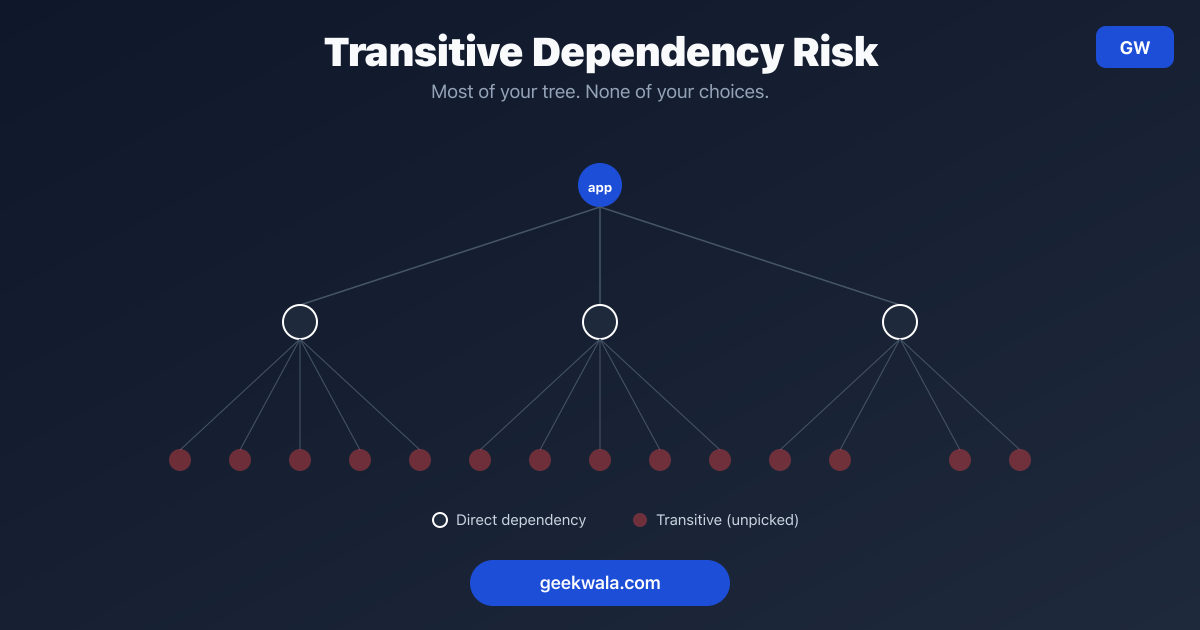
Scan package.json alone and you'll see the dozen or so packages you chose. Scan the lockfile behind it and you might see 1,300. That gap isn't a rounding error. It's most of your actual attack surface, and exactly where the CVEs your scanner should be finding actually live. Our transitive dependency risk piece goes deep on why that split skews so heavily toward the packages you didn't choose yourself.
Scanning only the manifest under-reports badly for a structural reason: a manifest records intent (the version ranges you declared), while a lockfile records reality (the exact versions your build actually resolved and shipped). A vulnerability scanner that reads package.json and stops there is scanning your intentions, not your software.
To be precise about what GeekWala does here: it parses manifests and lockfiles across all eight ecosystems it supports (Maven through pom.xml, which has no lockfile), matching resolved versions against vulnerability data. It doesn't currently track direct-versus-transitive relationships or map a finding back to the specific parent package that pulled it in. That's a distinct capability from lockfile parsing itself, worth stating plainly rather than implying more than the tool does today.
FAQ
Does a lockfile protect against dependency confusion?
Not on its own. If a dependency confusion attack was already active the first time your lockfile was generated, it locks in the malicious package right alongside everything legitimate. The lockfile just faithfully records whatever got resolved, attacker-controlled or not. Subsequent npm ci or pip install --require-hashes runs will keep using that locked-in resolution rather than re-attempting the attack, which helps after the fact, but the initial resolution is the moment that matters and a lockfile can't undo a bad one after it's already recorded.
Should I regenerate my lockfile regularly?
Yes, on a schedule, not just when you add a new dependency. A lockfile that hasn't been touched in six months is quietly accumulating unpatched versions of packages you never think about, because nothing forces a refresh until you deliberately trigger one. Pair scheduled regeneration with a scan immediately after: a fresh lockfile can just as easily introduce a new vulnerable transitive dependency as it removes an old one. If you're not already re-scanning on a cadence independent of when you touch the lockfile, automated dependency scanning closes that gap.
Why does my lockfile change when I didn't change any dependencies?
Usually one of three things: a transitive dependency's own manifest specifies a range that now resolves differently, your package manager updated its resolution algorithm between versions, or someone on your team ran an install with a slightly different package manager version and it re-resolved something. Diff the lockfile change in review the same way you'd review a code change. A lockfile diff you don't understand is worth a question before you merge it.
Does npm audit read the lockfile or the manifest?
The lockfile. By default npm audit requires a package-lock (or shrinkwrap): it needs the exact resolved versions, including the transitive ones you never declared, to match them against known vulnerabilities, and only the lockfile has that full resolved tree. This is the same reason npm audit and a manifest-only reading of package.json produce different vulnerability counts: the manifest doesn't contain the information the audit needs.
The Bottom Line
A committed lockfile is a snapshot of a decision you made once. Teams treat it as a safety control. It's closer to a dated receipt: useful precisely because it tells you what you bought and when, and useless for telling you whether it's since gone bad. Reproducibility, tamper detection where hashes exist, and an auditable transitive record are real and valuable. Safety, provenance, and staying current are separate jobs a lockfile was never built to do.
Scanning the lockfile, not just the manifest, is how you find out whether that snapshot has aged into a liability. Scan your dependencies now →: paste a lockfile or manifest from any of the eight ecosystems. No account is needed for up to 10 packages; sign in to scan up to 500 per scan.