CVE-2025-24894 — Vulnerability in SPID.AspNetCore.Authentication —...
CRITICAL
The AspNetCore Remote Authenticator for SPID Allows SAML Response Signature Verification Bypass
Published February 18, 2025Updated February 18, 2025Source: osv
Summary
### Description
Authentication using Spid and CIE is based on the SAML2 standard which provides for two entities:
Identity Provider (IdP): the system that authenticates users and provides identity information ( SAML assertions ) to the Service Provider, essentially, it is responsible for managing user credentials and identity;
Service Provider (SP): The system that provides a service to the user and relies on the Identity Provider to authenticate the user, receives SAML assertions from the IdP to grant access to resources.
The library `spid-aspnetcorerefers` to the second entity, i.e. the SP, and implements the validation logic of the SAML assertions present within the SAML response . The following is a summary diagram of an authentication flow via SAML:
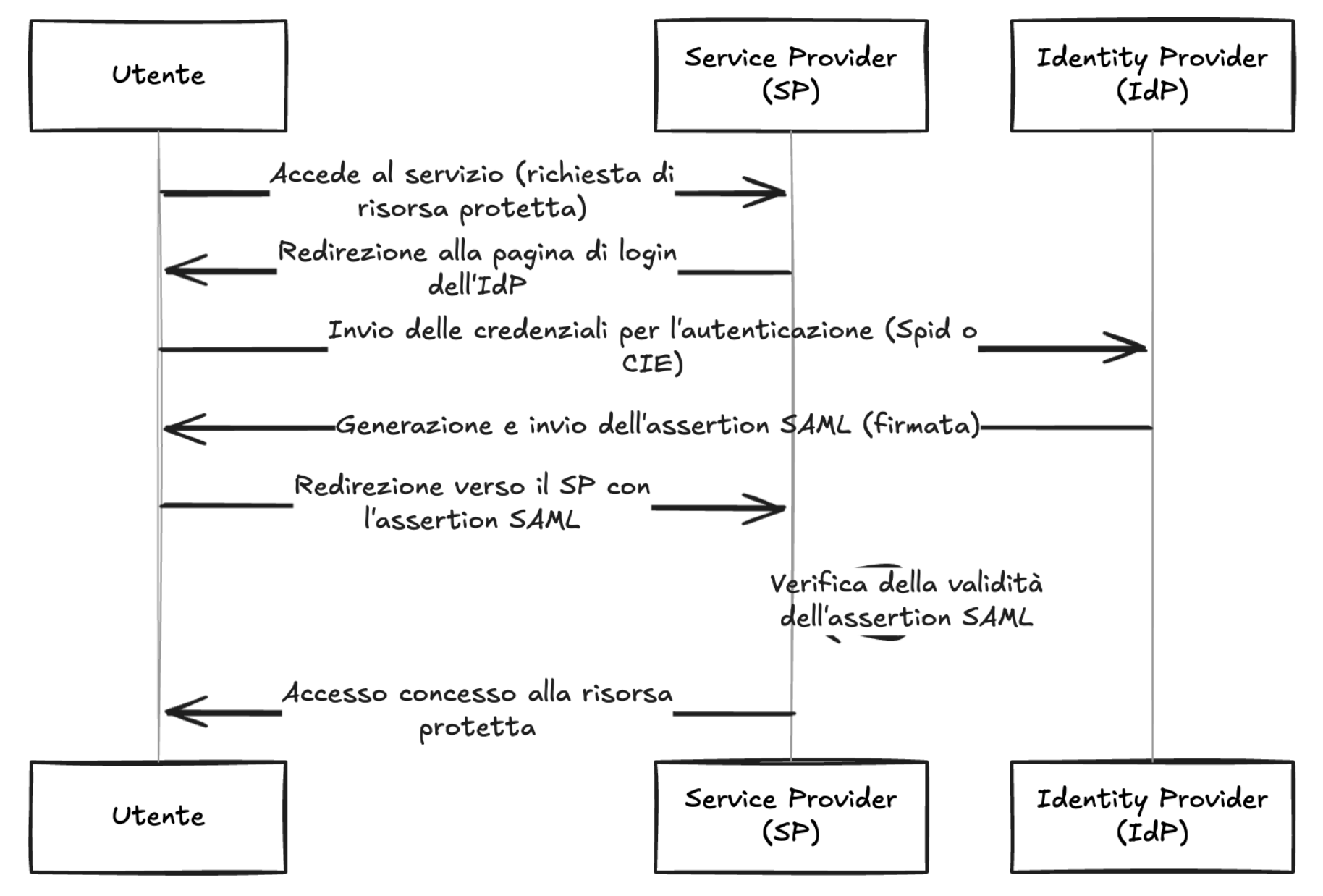
As shown in the diagram, the IdP, after verifying the user's credentials, generates a signed SAML response, this is propagated to the SP by the user's browser and the SP, after verifying the signature, can extract the data needed to build the user's session.
The signature validation logic is central as it ensures that you cannot craft a SAML response with arbitrary assertions and thus impersonate other users.
The following is the validation code implemented in `spid-aspnetcore`.
```csharp
internal static bool VerifySignature(XmlDocument signedDocument, IdentityProvider? identityProvider = null){
//...SNIP...
SignedXml signedXml = new SignedXml(signedDocument);
if (identityProvider is not null)
{
bool validated = false;
foreach (var certificate in identityProvider.X509SigningCertificates){
var publicMetadataCert = new X509Certificate2(Convert.FromBase64String(certificate));
XmlNodeList nodeList = (signedDocument.GetElementsByTagName("ds:Signature")?.Count > 1) ?
signedDocument.GetElementsByTagName("ds:Signature") :
(signedDocument.GetElementsByTagName("ns2:Signature")?.Count > 1) ?
signedDocument.GetElementsByTagName("ns2:Signature") :
signedDocument.GetElementsByTagName("Signature");
signedXml.LoadXml((XmlElement)nodeList[0]);
validated |= signedXml.CheckSignature(publicMetadataCert, true);
}
return validated;
}
else{
XmlNodeList nodeList = (signedDocument.GetElementsByTagName("ds:Signature")?.Count > 0) ?
signedDocument.GetElementsByTagName("ds:Signature") :
signedDocument.GetElementsByTagName("Signature");
signedXml.LoadXml((XmlElement)nodeList[0]);
return signedXml.CheckSignature();
}
//...SNIP...
}
```
The parameter `signedDocument` contains the SAML response in XML format, while the parameter `identityProvider` can contain the IdP info. If the parameter `identityProvider` has been specified, the public certificates of that IdP are extracted, so as to force their use during the signature verification, otherwise the certificates configured within the application are used.
Next, a response envelope is generated nodeList within which all XML elements containing an XML signature of part or all of the SAML response envelope are saved.
Finally, the first element of this list, i.e. the first signature found, is extracted and verified.
In a normal authentication flow, the SAML response looks like this (note that some fields and attributes have been omitted for ease of reading):
```xml
<samlp:Response ID="response_id" IssueInstant="2025-01-07T13:37:00Z" Version="2.0" xmlns:saml="urn:oasis:names:tc:SAML:2.0:assertion" xmlns:samlp="urn:oasis:names:tc:SAML:2.0:protocol">
<saml:Issuer Format="urn:oasis:names:tc:SAML:2.0:nameid-format:entity">
https://demo.spid.gov.it/validator
</saml:Issuer>
<ds:Signature xmlns:ds="http://www.w3.org/2000/09/xmldsig#">
<ds:SignedInfo>
<ds:CanonicalizationMethod Algorithm="http://www.w3.org/2001/10/xml-exc-c14n#"/>
<ds:SignatureMethod Algorithm="http://www.w3.org/2001/04/xmldsig-more#rsa-sha256"/>
<ds:Reference URI="#response_id">
<ds:Transforms>
<ds:Transform Algorithm="http://www.w3.org/2000/09/xmldsig#enveloped-signature"/>
</ds:Transforms>
<ds:DigestMethod Algorithm="http://www.w3.org/2001/04/xmlenc#sha256"/>
<ds:DigestValue>
<!-- DIGEST -->
</ds:DigestValue>
</ds:Reference>
</ds:SignedInfo>
<ds:SignatureValue>
<!-- SIGNATURE -->
</ds:SignatureValue>
<ds:KeyInfo>
<ds:X509Data>
<ds:X509Certificate>
<!-- CERTIFICATE -->
</ds:X509Certificate>
</ds:X509Data>
</ds:KeyInfo>
</ds:Signature>
<samlp:Status>
<samlp:StatusCode Value="urn:oasis:names:tc:SAML:2.0:status:Success"/>
</samlp:Status>
<saml:Assertion ID="assertion_id" IssueInstant="2025-01-07T13:37:00Z" Version="2.0" xmlns:xs="http://www.w3.org/2001/XMLSchema" xmlns:xsi="http://www.w3.org/2001/XMLSchema-instance">
<saml:Issuer Format="urn:oasis:names:tc:SAML:2.0:nameid-format:entity">
https://demo.spid.gov.it/validator
</saml:Issuer>
<ds:Signature xmlns:ds="http://www.w3.org/2000/09/xmldsig#">
<ds:SignedInfo>
<ds:CanonicalizationMethod Algorithm="http://www.w3.org/2001/10/xml-exc-c14n#"/>
<ds:SignatureMethod Algorithm="http://www.w3.org/2001/04/xmldsig-more#rsa-sha256"/>
<ds:Reference URI="#assertion_id">
<ds:Transforms>
<ds:Transform Algorithm="http://www.w3.org/2000/09/xmldsig#enveloped-signature"/>
</ds:Transforms>
<ds:DigestMethod Algorithm="http://www.w3.org/2001/04/xmlenc#sha256"/>
<ds:DigestValue>
<!-- DIGEST -->
</ds:DigestValue>
</ds:Reference>
</ds:SignedInfo>
<ds:SignatureValue>
<!-- SIGNATURE -->
</ds:SignatureValue>
<ds:KeyInfo>
<ds:X509Data>
<ds:X509Certificate>
<!-- CERTIFICATE -->
</ds:X509Certificate>
</ds:X509Data>
</ds:KeyInfo>
</ds:Signature>
<saml:AttributeStatement>
<saml:Attribute Name="spidCode" NameFormat="urn:oasis:names:tc:SAML:2.0:attrname-format:basic">
<saml:AttributeValue xmlns:xs="http://www.w3.org/2001/XMLSchema" xmlns:xsi="http://www.w3.org/2001/XMLSchema-instance" xsi:type="xs:string">
AGID-001
</saml:AttributeValue>
</saml:Attribute>
<!-- ... SNIP ... -->
</saml:AttributeStatement>
</saml:Assertion>
</samlp:Response>
```
The SDK code would get as the first element of the `nodeList`, that is `nodeList[0]`, the signature referring to the entire SAML response, in fact the reference of the first signature `<ds:Reference URI="#response_id">` points to the root object `<samlp:Response ID="response_id" ...>`. Therefore, verifying this signature will ensure that the entire content of the SAML response is intact and authentic.
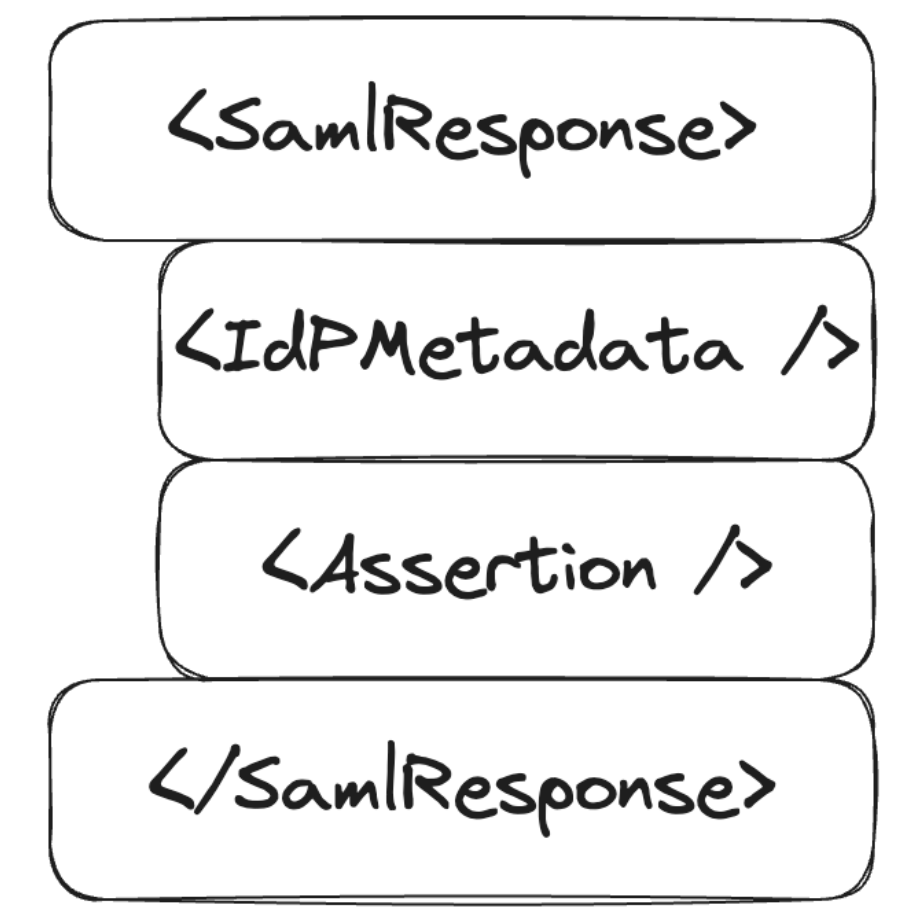
However, there is no guarantee that the first signature refers to the root object, so if an attacker injects a signed element as the first element, all other signatures will not be verified. The only requirement is to have a legitimately signed XML element from the IdP, which is easily accomplished using the public metadata of the IdP.
The SAML response would be structured like this:
### Impact
An attacker could craft an arbitrary SAML response that would be accepted by SPs using the vulnerable SDKs, allowing him to impersonate any Spid and/or CIE user.
### Complexity of the attack
The attacker needs an XML block containing a valid signature from one of the IdPs accepted by the SP. As described above, this requirement is satisfied by reading the public metadata of the IdP which is represented by a signed XML block of the IdP.
### Related issues
N/A
### PoC
1. Clone the repository https://github.com/italia/spid-aspnetcore.git
2. From the root of the project, enter the folder relating to the example webapp: `samples/1_SimpleSPWebApp/SPID.AspNetCore.WebApp/`
3. Change the value of the `AssertionConsumerServiceURL` key in the file `appsettings.json` to a custom domain: `https://$CUSTOM_DOMAIN:$CUSTOM_PORT/signin-spid`
4. Compile and run the sample webapp using the following command, taking care to replace the placeholders with the same values used in step 3: `dotnet build "SPID.AspNetCore.WebApp.csproj" -o ./app/build && dotnet publish "SPID.AspNetCore.WebApp.csproj" -o ./app/publish && dotnet ./app/publish/SPID.AspNetCore.WebApp.dll -urls=https://$CUSTOM_DOMAIN:$CUSTOM_PORT`
5. Visit URL: `https://$CUSTOM_DOMAIN:$CUSTOM_PORT/`
6. Click "Enter with SPID" > "DemoSpid" (second IdP in the list)
7. Visit the "Response" > "Check Response" section
8. Insert the following string into the "Audience" field (right column): `https://spid.aspnetcore.it/`
9. Click "Send response to Service Provider", note the redirect to `/home/loggedin` and consequently the correct execution of the login on the example portal

10. Repeat steps 5 to 8 inclusive
11. Intercept the HTTP request generated in step 8 via an HTTP Proxy, such as PortSwigger's BurpSuite
12. Perform URL-decoding and Base64-decoding of the POST `SAMLResponse` parameter
13. Insert the content present at the following URL in the second line of the XML: https://demo.spid.gov.it/metadata.xml
14. Change the contents of the tag `<saml:Assertion>`, for example change the `email` attribute to an arbitrary value: `spid.tech@shielder.it`
15. Run Base64-encoding and then URL-encoding the `SAMLResponse` parameter
16. Send the request and note the redirect to `/home/loggedin` which demonstrates the correct identification and therefore also the verification of the arbitrary signature inserted in `SAMLResponse` despite the modification of the assertion

### Recommended Solution
Verify all signatures within the SAML response and do not accept unsigned XML elements.
### References
- https://cheatsheetseries.owasp.org/cheatsheets/SAML_Security_Cheat_Sheet.html
### Credits
- [Abdel Adim `smaury` Oisfi](https://x.com/smaury92) di [Shielder](https://www.shielder.com)
- [Paolo`paupu` Cavaglià](https://x.com/paupu_95) di [Shielder](https://www.shielder.com)
- [Nicola `fromveeko` Davico](https://x.com/fromveeko) di [Shielder](https://www.shielder.com)
Advisory Timeline
First published February 18, 2025 (601 days ago).
Last revised February 18, 2025 — 0 days after initial publication.
Remediation
Upgrade to the fixed version using your package manager.
NuGet
Update SPID.AspNetCore.Authentication to 3.4.0 or later
The AspNetCore Remote Authenticator for SPID Allows SAML Response Signature Verification Bypass This vulnerability has been assigned a severity rating of CRITICAL (CVSS score: 9.1/10).
How do I check if my project is affected by CVE-2025-24894?
CVE-2025-24894 affects SPID.AspNetCore.Authentication. Use GeekWala's free vulnerability scanner to check your dependencies against CVE-2025-24894 and 200,000+ other known vulnerabilities.
Severity & Exploitability
CVSS Score
9.1
Exploitation is straightforward and causes maximum impact. Patch immediately.