Python's security tooling is more fragmented than npm's — multiple advisory databases don't fully sync, and transitive dependency trees can run 100+ packages deep. pip-audit is a solid local tool but misses exploitation signals and some database coverage. For production monitoring, layer in EPSS and CISA KEV on top of advisory data. Always use lock files — without them, scanning is guesswork.
The data science team ran pip install and went home. Six months later, a vulnerability buried three levels deep in their TensorFlow dependency chain made it into their production API. Nobody had scanned for it. Nobody knew it was there.
pip install requests pulls in 4 dependencies. pip install tensorflow pulls in 97. Any of them could be vulnerable—and Python's advisory ecosystem is fragmented enough that no single tool will catch everything. Unlike npm, which has a unified advisory database and npm audit baked into the CLI, Python's vulnerability data lives scattered across NVD, OSV, PyPI, and GitHub advisories that don't fully sync with each other.
This guide cuts through the fragmentation: here's why Python scanning is harder than Node, what each tool actually covers, and how to build a practical workflow that catches the vulnerabilities that matter before they reach production. (New to the concept? Our guide to what dependency vulnerability scanning is covers the fundamentals — CVE matching, EPSS, and CISA KEV — that this Python-specific workflow builds on.)
What We'll Cover
- Why Python dependency scanning is harder than npm
- What dependency files GeekWala scans (and which it can't)
- pip-audit vs GeekWala: feature comparison
- Real-world cascading vulnerability examples
- Step-by-step scanning workflow
- Why Python scanning differs from Node
- Python dependency security best practices
The Python Dependency Landscape (It's Messier Than You Think)
Python's security problems stem from architectural choices made years ago, before security became table stakes:
Multiple advisory databases that don't sync: npm has a single security advisory channel. Python has fragmented databases where no single source covers everything:
| Where a Python vulnerability appears (approximate) | Share of Python vulns |
|---|---|
| In PyPI advisories, OSV/GitHub and NVD (overlap) | ~55% |
| Only in PyPI advisories | ~15% |
| Only in OSV / GitHub | ~10% |
| Only in NVD (C extension vulns, system lib vulns) | ~20% |
| In none of them (gap) | ~5-10% |
The shares are approximate and rounded, so they add up to slightly more than 100%.
A vulnerability might be in NVD but skipped by the PyPI project. Or disclosed on GitHub but not reported to NIST. pip-audit queries PyPI (the default) or OSV. safety queries its own database. You could scan the same project with both tools and get different results. GeekWala queries OSV, which aggregates the PyPA and GitHub advisory databases.
Dependency manifest chaos: Python has too many ways to declare dependencies, and tools don't support all of them equally:
| File Type | What It Does | Tool Support |
|---|---|---|
requirements.txt | Exact pinned versions (best) | Most tools, but often ignores comments |
setup.py | Declarative with metadata | Requires parsing Python code (fragile) |
setup.cfg | INI-style declarative | Good support, rarely used |
pyproject.toml | Modern standard | Growing support, edge cases remain |
poetry.lock | Lock file from Poetry | Limited tool support |
Pipfile.lock | Lock file from Pipenv | Barely supported outside Pipenv |
A project using poetry.lock? Some scanners just ignore it. Using pyproject.toml with complex version specs? You might get false positives or false negatives on transitive dependencies. For which Python file gives exact, scannable versions, see scanning requirements.txt, Pipfile.lock, or poetry.lock online.
Transitive dependencies explode: Data science projects are notorious for this. Install scipy, get 30 indirect packages. Install tensorflow, get 100+. Each one is a potential vulnerability vector. Tracking exact versions across this tree requires lock files and accurate resolution—and many Python teams skip lock files entirely.
Slow disclosure cycle: JavaScript has a rapid-response culture. A Node.js vulnerability drops on Monday, exploit PoC on Wednesday, everyone patches by Friday. Python projects? Some take months to report fixes. Obscure packages might never get fixes.
What Dependency Files GeekWala Actually Scans
Three Python formats are scanned directly; anything else needs turning into one of them first:
| File | Scanned? | What to know |
|---|---|---|
requirements.txt | Yes | Exact pins only (requests==2.31.0). A range like requests>=2.0 can't be mapped to one version, so it can't be checked. |
poetry.lock | Yes | The full resolved tree, transitive dependencies included. |
Pipfile.lock | Yes | The full resolved tree, transitive dependencies included. |
| pip-compile output | Yes, as requirements.txt | It is a fully pinned requirements file — upload or paste it as requirements.txt. |
pyproject.toml, setup.py, setup.cfg | No | They declare ranges, not installed versions. Scan your lock file, or the output of pip freeze, instead. |
Real talk: If you're not using a lock file, you're not getting accurate vulnerability scanning. Period. Tools can't map requests>=2.0 to a specific version unless they resolve it themselves, and different environments might resolve to different versions. Use poetry.lock, Pipfile.lock, or pip-compile output. Commit it. Move on.
pip-audit vs GeekWala: When Each Tool Makes Sense
pip-audit is maintained under the Python Packaging Authority. It's lightweight and genuinely trustworthy. But "PyPA-maintained" doesn't mean "sufficient."
Its strengths are real: it runs locally against your environment or a requirements file and supports hash-checked installs (--require-hashes). But it has Python-specific limitations that matter for production security:
| Capability | pip-audit | GeekWala |
|---|---|---|
| Advisory sources | PyPI (default) or OSV | OSV, which includes the PyPA database, + EPSS + CISA KEV |
poetry.lock / Pipfile.lock | ✗ (requires pip format) | ✓ native parsing |
| Virtualenv integration | ✓ pip-audit -r / --strict | ✗ (file upload) |
| Exploitation signals | None (output has no severity column) | EPSS + CISA KEV |
| C extension vuln coverage | Limited (Python advisories only) | Limited too (C-layer CVEs appear when the package's own advisory lists them, as Pillow's do) |
| Historical trend tracking | ✗ | ✓ (per-project vulnerability history; EPSS shown is today's) |
Use pip-audit for local development — it catches obvious issues with zero setup and integrates into virtualenvs. Run it in pre-commit hooks.
Use GeekWala for production monitoring — the EPSS and KEV enrichment matters when you're prioritizing 50+ findings across a team. Scan your Python dependencies →
For a deeper look specifically at the CVSS-vs-EPSS prioritization gap — with a reproducible fixture showing how EPSS and CISA KEV reorder pip-audit's 79 findings — see What pip-audit Misses.
See which PyPI vulnerabilities in your project are actually being exploited.
Upload your requirements.txt or poetry.lock → — get findings enriched with EPSS scores and CISA KEV status in under a minute. No account needed for up to 10 packages.
Real-World Python Vulnerability Examples
Vulnerabilities rarely stay contained in a single package. They cascade:
Example 1: urllib3 → requests → your app
In 2023, urllib3 had CVE-2023-45803 (CVSS 4.2, Moderate): after a 303 redirect switched a request to GET, the request body was still sent to the new location. Your app doesn't directly depend on urllib3 — it comes in transitively:
your-app/
├── requirements.txt
│   └── requests==2.31.0  ← you chose
│       ├── urllib3==2.0.5 ← came along
│       │   └── 🔴 CVE-2023-45803
│       ├── charset-normalizer
│       ├── idna
│       └── certifi
└── ...
pip-audit and GeekWala both report the vulnerable package — urllib3 — rather than the chain that pulled it in; pipdeptree -r -p urllib3 shows that chain. Here the fix is to require urllib3 2.0.7 or later: requests 2.31.0 accepts any urllib3 below 3, so the patched release fits its constraint without touching requests.
Example 2: cryptography (the cascading dependency)
cryptography is installed by 80%+ of PyPI packages, either directly or transitively. When cryptography-41.0.0 had a critical issue, it affected thousands of projects:
- Django projects using encryption
- FastAPI apps with auth
- Data science projects using paramiko for SSH
- ML pipelines using TensorFlow
A single vulnerability cascaded through dozens of unrelated packages. Your scanner must track this path accurately.
Example 3: YAML deserialization in PyYAML
PyYAML versions < 6.0 deserialize arbitrary Python objects by default. This is a code execution vulnerability if you load untrusted YAML. But if you control all YAML being loaded, it's a false positive.
CVSS says "Critical" (9.8). EPSS says "Low" (0.15). Why? Because most exploits require you to already control the input. Scanners that only look at CVSS flag this as critical. Scanners that include EPSS deprioritize it. GeekWala shows both, so you decide.
Setting Up Python Scanning: A Practical Workflow
Step 1: Audit your current state
# If using pip + requirements.txt
pip freeze > requirements.txt

# If using Poetry
poetry lock  # Already committed

# If using Pipenv
pipenv lock  # Already committed

# If using setuptools + pyproject.toml
# Ensure [project] section exists with dependencies
Step 2: Upload to GeekWala
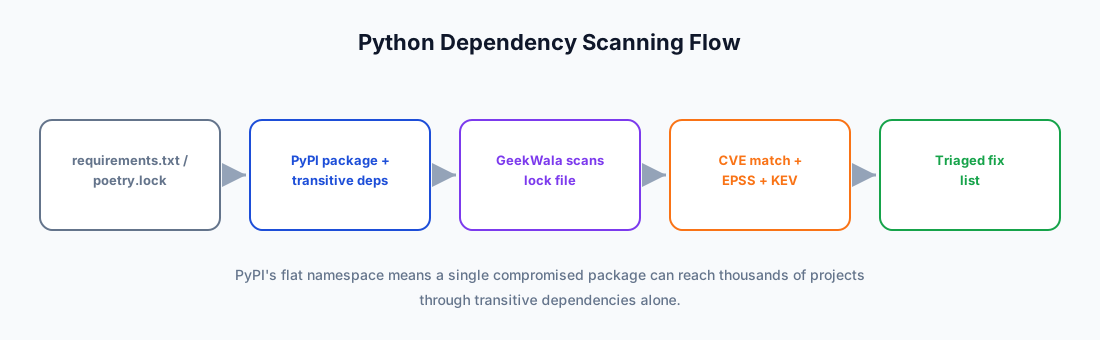
Visit GeekWala's Python scanning page and upload your dependency file. GeekWala parses it, checks each package against OSV (which includes the PyPA and GitHub advisory databases), and adds EPSS and CISA KEV to every finding.
Step 3: Interpret the results
GeekWala enriches each finding with three signals: CVSS (severity), EPSS (exploitation probability), and CISA KEV (confirmed active exploitation). Work them KEV first, then EPSS — not by CVSS; GeekWala's default ranking already follows that order.
For Python specifically, pay extra attention to vulnerabilities in these high-impact packages:
Critical Python packages (a vulnerability here is urgent regardless of EPSS):
cryptography: used by 80%+ of PyPI transitivelyurllib3: under requests, the most-installed packagenumpy/scipy: C extensions = memory safety riskspillow: image parsing = classic attack surfacedjango/flask: web framework vulns = direct exposure
Step 4: Trace the dependency path
GeekWala names the vulnerable package and the version that fixes it. To see which of your direct dependencies brought it in, run pipdeptree -r -p <package> (or poetry show --tree), then decide whether updating that dependency or requiring the fixed version yourself is the smaller change.
Step 5: Set up scheduled scanning
For production projects, set up scheduled scans:
- Daily or weekly automatic scans (Pro)
- A
scan.completedwebhook posts the new and resolved vulnerabilities to your own endpoint after each scan - Custom thresholds in the GitHub Action (e.g., "fail CI if any finding with a known fix has EPSS above 0.8")
Why Python Dependency Security Is Different From Node
Python teams often ask: "Why can't Python scanning be as simple as npm?"
Three reasons:
-
No centralized advisory database: npm's advisory system is built into the registry. Python's advisory data lives in multiple places that don't sync. This means no tool can be 100% comprehensive without querying multiple sources.
-
Fragmented package ecosystem: Python allows pure wheels, C extensions, system bindings, and mixed environments. A vulnerability in NumPy's C layer might not appear in Python-specific databases. You need cross-ecosystem scanning.
-
Multiple manifest formats with poor tooling support: npm has
package.jsonandpackage-lock.json. Python has 7 different ways to declare dependencies, and tools support different subsets. Poetry users get different scanning coverage than pip users. This is architectural fragmentation.
Bottom line: Python scanning requires more vigilance. Use lock files. Use multiple sources. Monitor EPSS scores, not just CVSS. And run continuous scans—a new exploit might emerge months after a CVE is published.
Python Dependency Security Best Practices
1. Always use lock files
Never commit abstract versions. Use poetry.lock, Pipfile.lock, or a fully pinned requirements.txt from pip-compile or pip freeze. This is non-negotiable. Your CI environment must build the same dependency tree every time, otherwise scanning is meaningless.
2. Automate lock file updates
Python's dependency trees are deep. Use:
pip-compile(pip-tools) for requirements.txtdependabot(GitHub) for automatic updatesrenovate(GitLab/GitHub) for sophisticated version bumping
Let these tools handle transitive dependency updates automatically. Review the PRs, test in CI, merge. Don't manually manage lock files for large projects.
3. Scan weekly, not just before release
EPSS scores change constantly. A vulnerability disclosed with EPSS 0.1 might spike to 0.9 when a PoC emerges. Weekly scans catch rising trends before they become emergencies.
4. Monitor data science libraries obsessively
NumPy, SciPy, Pandas, TensorFlow—these are high-value targets. A vulnerability in NumPy affects 100,000+ downstream projects. Don't ignore "moderate" CVSS vulnerabilities in these packages. Patch them faster than you would a low-traffic package.
5. Understand the difference between "patched" and "fixed for your code path"
A package might have a vulnerability you don't actually hit. Example: "Deserialization vulnerability in YAML parser—only affects untrusted YAML input." If you only load YAML you control, you might defer patching. But this is conservative thinking. Supply chain attacks could inject new code later. Patch conservatively.
6. Keep cryptography up to date
cryptography is installed by ~80% of PyPI packages transitively. When it has a vulnerability, update it immediately. Don't wait for dependency chains to bubble up the update—pin it directly if needed.
7. Test updates in staging before production
A newer version of Django might fix a vulnerability but break an integration point. Test in staging. Never auto-deploy critical library updates to production without human verification.
Frequently Asked Questions
What if a transitive dependency has a vulnerability but the direct parent doesn't?
You're still responsible. In Python, transitive dependencies are where most vulnerabilities hide — requests alone brings in 4 packages. Update the parent package (preferred) or pin the transitive dependency directly in your lock file. Use pip-compile or poetry update to resolve the chain cleanly.
My project uses setup.py with install_requires — can I scan it?
Not directly. setup.py declares abstract version ranges (requests>=2.0), which can't be mapped to specific vulnerable versions, so GeekWala doesn't parse it — the same goes for setup.cfg and pyproject.toml. Scan your poetry.lock or Pipfile.lock if you have one; otherwise run pip freeze > requirements.txt from your virtualenv and scan that pinned snapshot.
A vulnerability was published, but my scanner didn't catch it — why?
Python's advisory fragmentation is real, but it isn't a timing problem. PyPI advisories typically appear the same day as the NVD entry (median 0 days, n=738), and 28.6% of the time the advisory came first. The gap is coverage: about 5.6% of PyPI advisories have no CVE ID, so CVE-keyed tools never see them. GeekWala queries OSV, which aggregates several upstream databases, because coverage differs between them, not because propagation is slow. For C extension vulnerabilities (numpy, pillow, cryptography), NVD often leads — these may not appear in PyPI advisories at all.
Does GeekWala work with private PyPI repositories?
Not as such. GeekWala doesn't authenticate to private registries and never downloads packages: it matches package names and versions against public advisory data (OSV), so a package that exists only on a private index has no public advisory and shows no findings. If your private package wraps a public library, vulnerabilities in the public library are still detected when that library appears in your lock file. Enterprise private registry support is planned.
I have 50+ vulnerabilities — where do I start?
Start with the CISA KEV entries, then work down by EPSS — GeekWala's default ranking already puts findings in that order. For the full prioritization framework, see our EPSS deep dive. For Python specifically, also prioritize C extension libraries (cryptography, numpy, pillow) higher, since their vulnerabilities often involve memory safety issues that bypass Python's protections.
Can I use pip-audit --fix and then verify with GeekWala?
That's a solid workflow. pip-audit --fix attempts automatic resolution within your virtualenv. After fixing, regenerate your lock file and rescan with GeekWala to verify the fix didn't introduce new transitive vulnerabilities — which happens more often than you'd expect in deep Python dependency trees.
Does GeekWala support conda or mamba environments?
GeekWala doesn't parse environment.yml or conda lock files directly — conda uses its own package format and registry separate from PyPI. However, most conda environments also have pip-managed packages. Export those with pip freeze > requirements.txt (run from within your activated conda environment) and scan the requirements file. For pure conda packages (channels like conda-forge or defaults), use jake (Sonatype's open-source conda scanner) or the anaconda audit scan command if you're on the Anaconda commercial platform. Mamba works the same way since it's a drop-in conda replacement.
See Dependency Security Across 8 Ecosystems for how Python fits into multi-language stacks. For a side-by-side comparison of all ecosystem scanners, see 5 Ecosystem-Native Dependency Scanners Compared.
2026 Supply Chain Alert: PyPI continues to be a high-value target for supply chain attacks — in early 2026, researchers discovered multiple waves of malicious packages impersonating popular libraries. If your Python projects pull from PyPI, read Supply Chain Attacks on Open Source in 2026 for the latest attack patterns and defenses.
See which Python vulnerabilities are actually being exploited — not just which ones exist.
Upload your requirements.txt or poetry.lock → — get results enriched with EPSS exploitation scores and CISA KEV status in under a minute. No account needed for up to 10 packages.